How to catch distributor price increases before they eat your margin
Compare every invoice line with the last cost you paid, and reprice the same week. Here's why cost increases slip past liquor and convenience store owners, what one missed increase costs, and how to check invoices fast.
Arjun ChemparathyPublished 4 min read
To catch a distributor price increase, compare every invoice line with the last cost you paid for that item, and fix the shelf price the same week. Increases rarely announce themselves. They show up as a few cents on a line you didn't read, on an invoice whose total looked about normal. Left alone, they come straight out of your margin on every unit you sell, until somebody notices.
Why price increases slip by
- Invoices are long. A weekly beer or spirits delivery can run to dozens of lines. Nobody reads every one on a busy delivery day.
- The total looks normal. A few cents more on a dozen items doesn't stand out against a four-figure invoice.
- Units are confusing. Distributors price by the case, the pack or the bottle. A case price that went up $1.20 is 10 cents a can, which is easy to miss and hard to compare.
- Deals end quietly. A deal price you've been paying for months turns back into the regular price, and nothing on the invoice says so.
- Deposits and CRV muddy the totals. CRV and deposits change with the quantity, so a higher total doesn't always mean a higher price, and a steady total can hide one.
What one missed increase costs
One slow item doesn't matter much. A whole invoice of them does, and so does every month they go unnoticed.
How to check an invoice by hand
If you check invoices yourself, ten minutes on delivery day covers most of the risk:
- Start with your best sellers. A cost increase on something you sell 50 of a week matters far more than one on a bottle you sell twice a month.
- Compare the unit cost, not the line total. Divide the case price by the units in the case, and compare it with what you paid last time.
- Check the pack size. A "case" that went from 24 to 18 units at the same price is an increase.
- Look for ended deals. If a line used to show a discount and doesn't now, your cost went up.
- Write down what changed and fix those shelf prices before the end of the week.
Set a target margin for each category
A target margin tells you what the shelf price should be when the cost changes. Margin is profit as a share of the price: an item that costs $14.00 and sells for $20.00 has a 30% margin.
Set one target per category rather than one for the whole store. Beer and soda usually run thinner than spirits and wine, and a single number will be wrong for most of the store. With a target, repricing is arithmetic: new price = cost ÷ (1 − target margin). At a 30% target, a $15.00 cost means $21.43.
How Ceyyo catches increases for you
Ceyyo does the comparison for you:
- Forward the invoice. Each store gets its own Ceyyo email address. Forward the distributor's invoice email to it, or upload the PDF.
- Ceyyo reads it. Every line is matched to the product on your shelf, with the cost worked out per unit you sell.
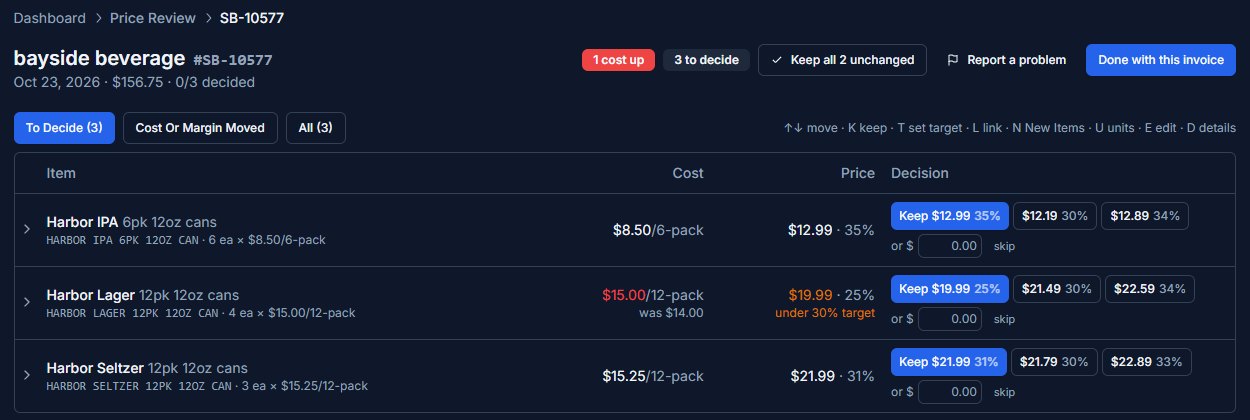
- Price Review shows what changed. For each item you see the new cost, your margin at today's price, and a suggested price for your category's target margin.
- You decide. Keep the price, or set a new one. The new price goes to your register. Nothing changes until you choose.
You can do it on the web dashboard or on the Ceyyo phone app, the day the invoice arrives.
Habits that help
- Review on delivery day, while the invoice and the product are both in front of you.
- Keep invoices in one place. One inbox, or one Ceyyo address, so nothing gets lost.
- Ask your rep about upcoming increases and when current deals end. They usually know before the invoice does.
- Recheck your top sellers every month, even when nothing seems to have changed.
Questions
- How often do distributors raise prices?
- Any time. Increases often arrive on a normal invoice with no separate notice, and deals end quietly. The only reliable way to catch them is to check every invoice against what you paid last time.
- What's the difference between margin and markup?
- Margin is profit as a share of the selling price. Markup is profit as a share of the cost. An item that costs $14.00 and sells for $20.00 has a 30% margin but a 43% markup.
- Should I raise the price every time my cost goes up?
- Not always. Some items are priced to bring people in, and some sit at a price customers watch closely. But you should decide on purpose, not find out months later. Check your margin on every increase, then keep the price or change it.
- Can software read my distributor invoices?
- Yes. Ceyyo reads invoices that distributors email as PDFs, matches each line to your products, and shows you the new cost and margin before anything changes.