NewDistributor invoices, read for you

The register that keeps up.

Ceyyo is the point of sale for liquor and convenience stores, built by people who run one. Your cashier gets it on day one, deals and ID checks take care of themselves, and the whole day is on your phone.

01 · At the counter

One sale, start to finish.

Every screen here is the real register. No training binder: if your cashier can use a phone, they can run it.

  1. 01 · Tap or type

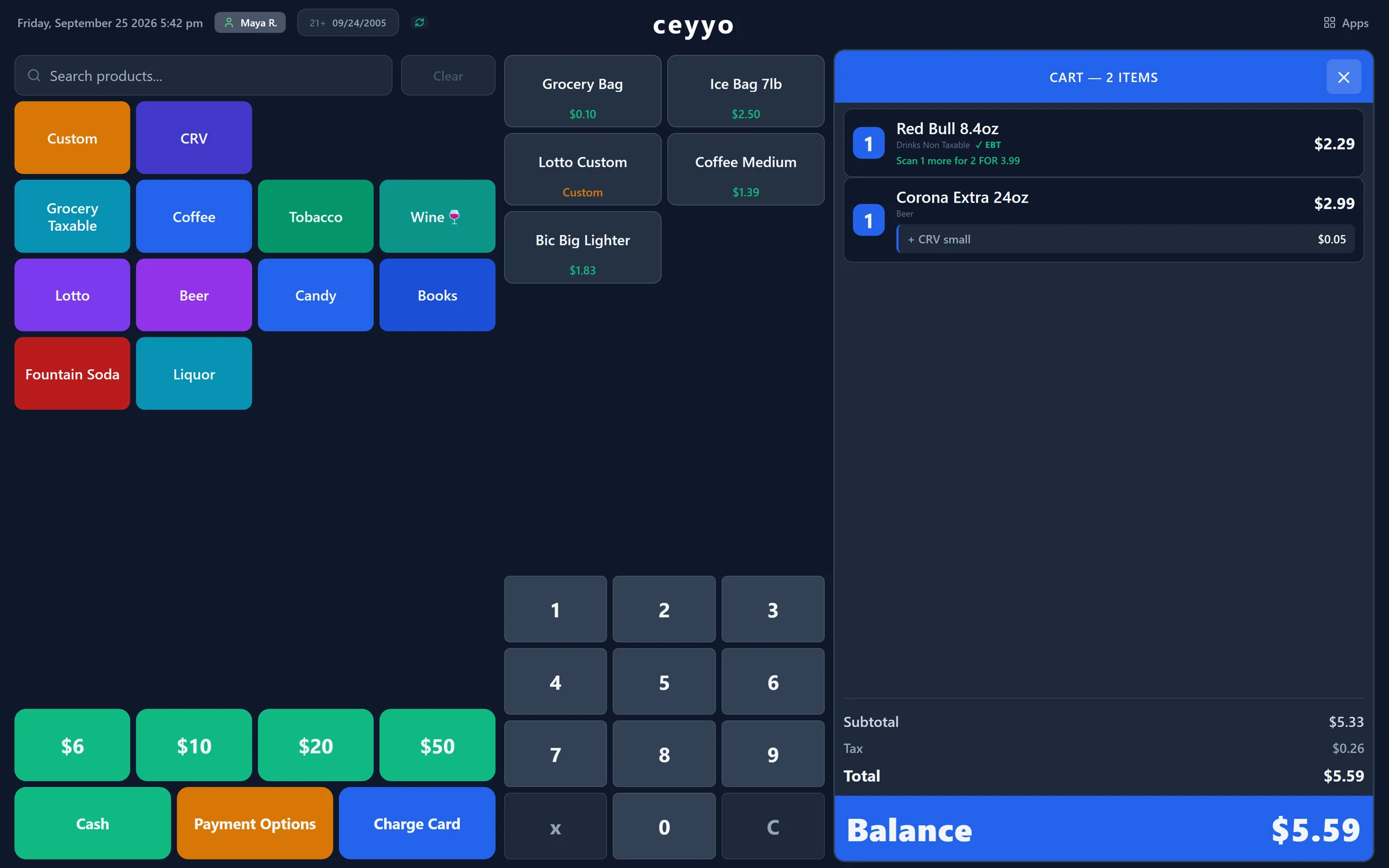
    Tap it or type it.

    Bags, ice and lotto live on big tiles, and open-price items like lotto ask for the amount. Anything else is a few letters away: type part of a name and every match shows with its price.

    Ceyyo register with category tiles, one-tap shortcuts, and a cart hinting one more Red Bull makes the deal
  2. 02 · Deals

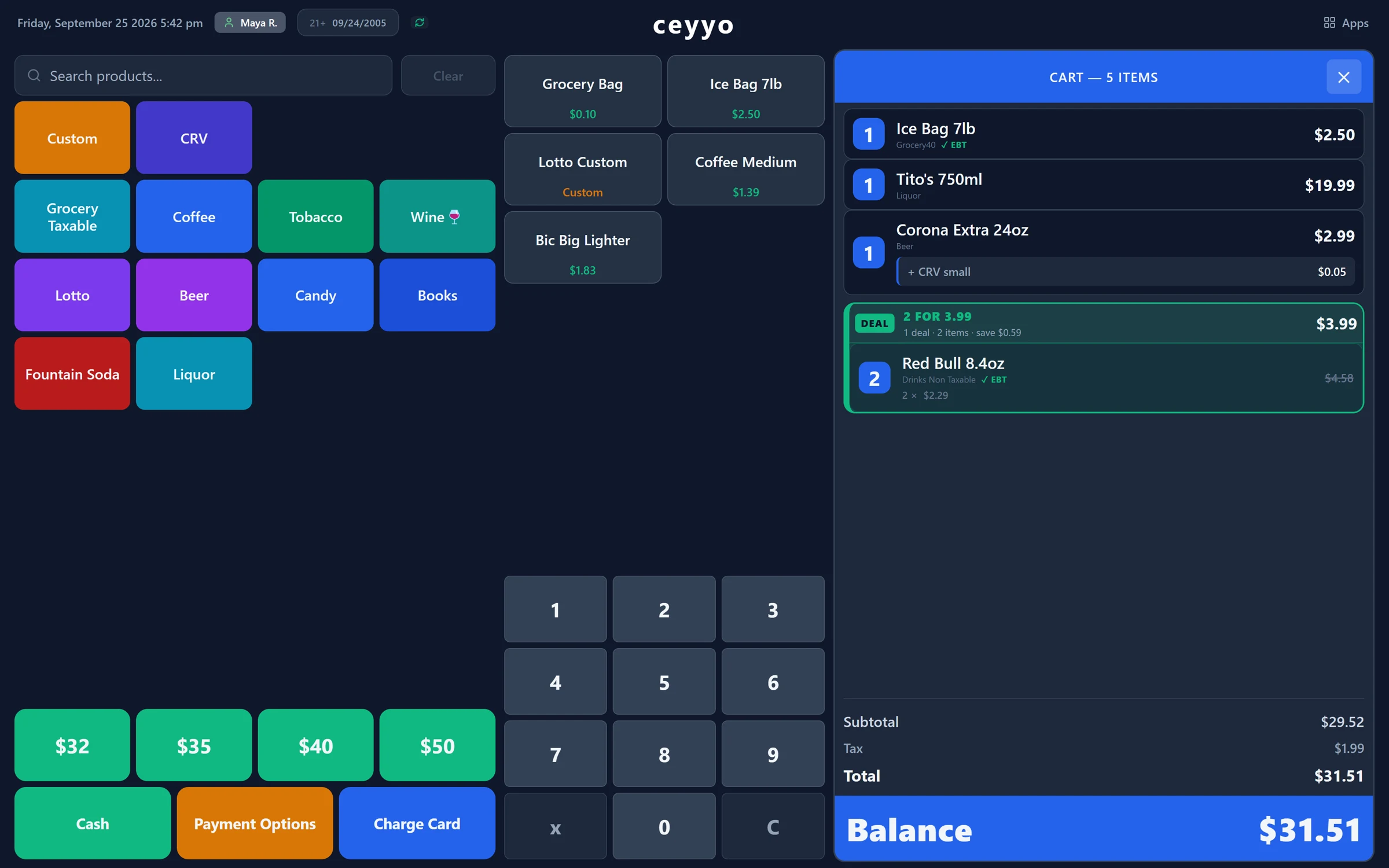
    Deals apply themselves.

    Set 2 for $3.99 once. Scan one Red Bull and the register says one more makes the deal. Scan the second and the price drops, right on the receipt.

    Cart with a 2 for $3.99 Red Bull deal card, Tito's, Corona and ice
  3. 03 · ID check

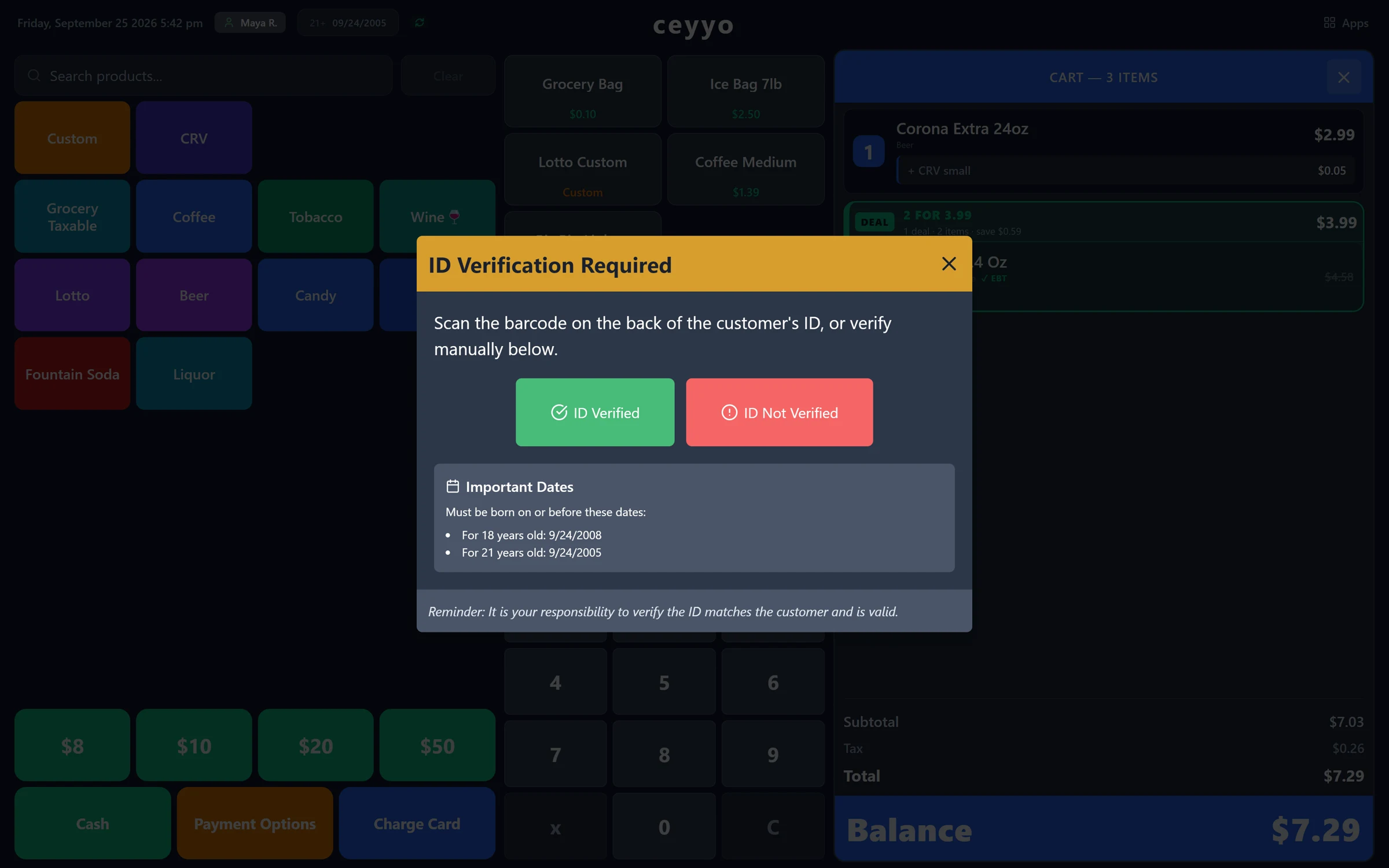
    Beer asks for ID. Every time.

    Anything age-restricted stops the sale until the ID is scanned or checked, with today's cutoff birthdays on screen.

    ID Verification Required dialog with the 18 and 21 cutoff dates
  4. 04 · Pay

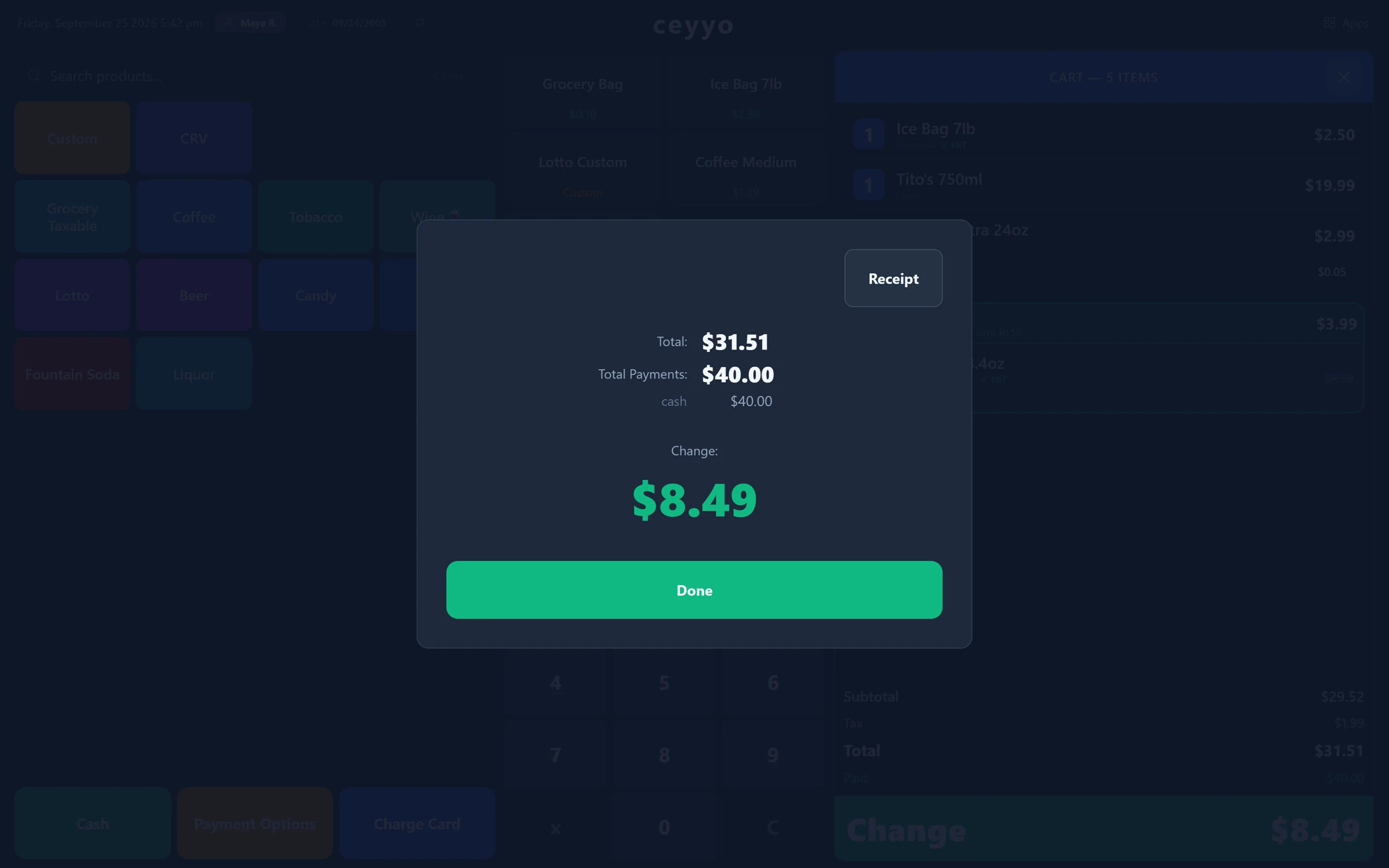
    Cash in two taps.

    The register offers the bills the customer is likely to hand over. Tap one, the change shows big, the drawer opens. Next.

    Change due $8.49 shown large after a $40 cash payment

02 · Wherever you are

Your whole day, in your pocket.

At the counter, at home, or at your kid's game: the owner app shows what the register saw, the moment it happened.

  • Sales as they happen

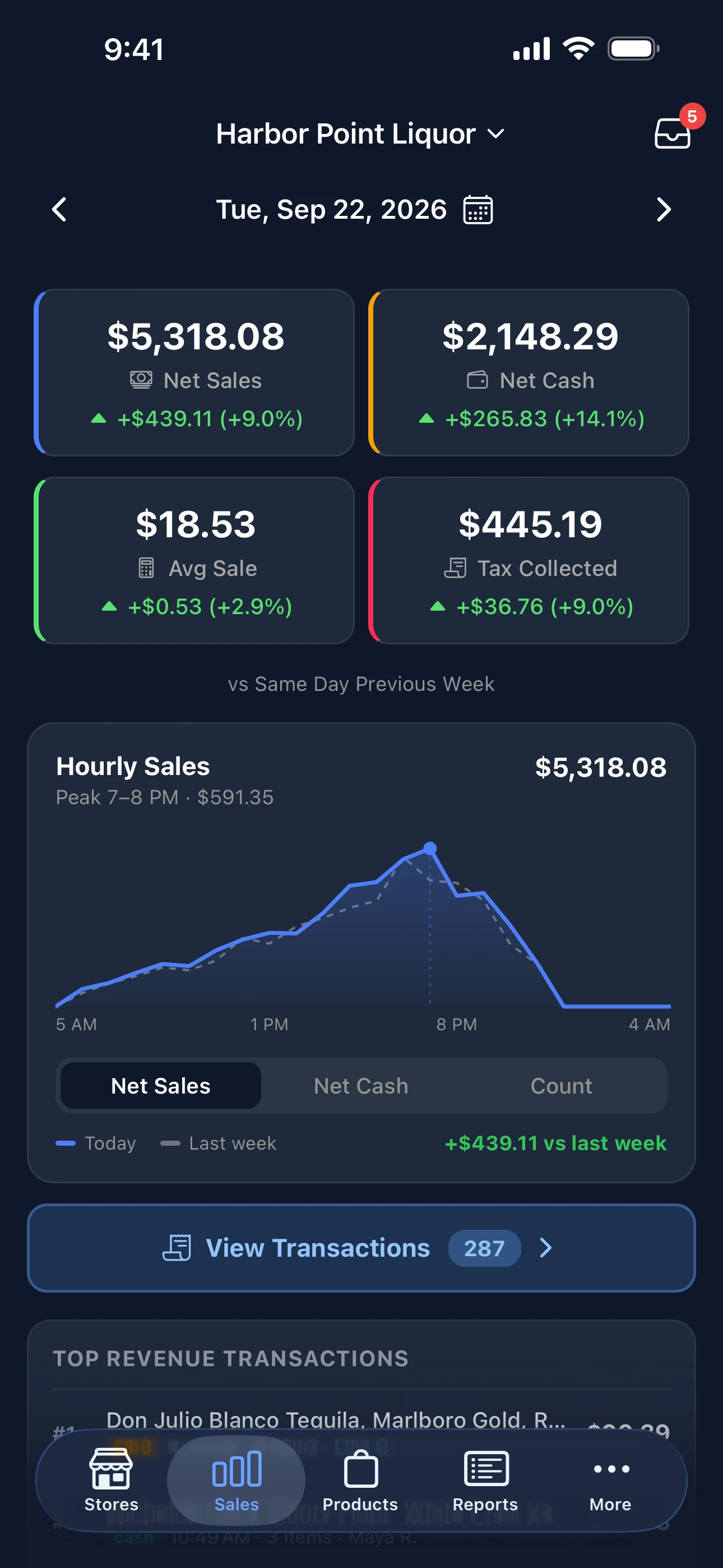
    Net sales, cash and card, average ticket and tax, each against the same day last week, with an hourly chart.

  • Every receipt, in full

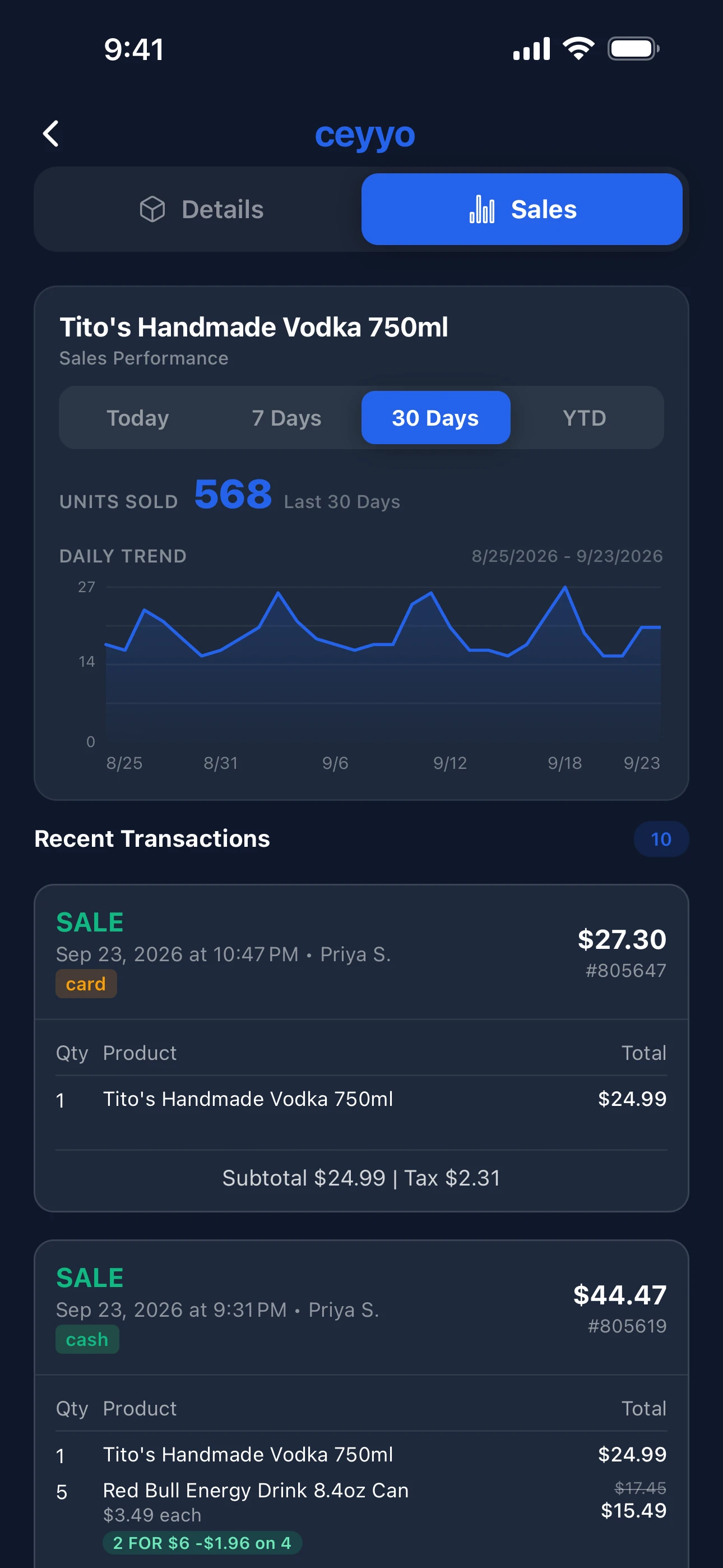
    Tap any sale for the items, the tender, the cashier and the time. Returns and voids are called out.

  • A tap on the shoulder

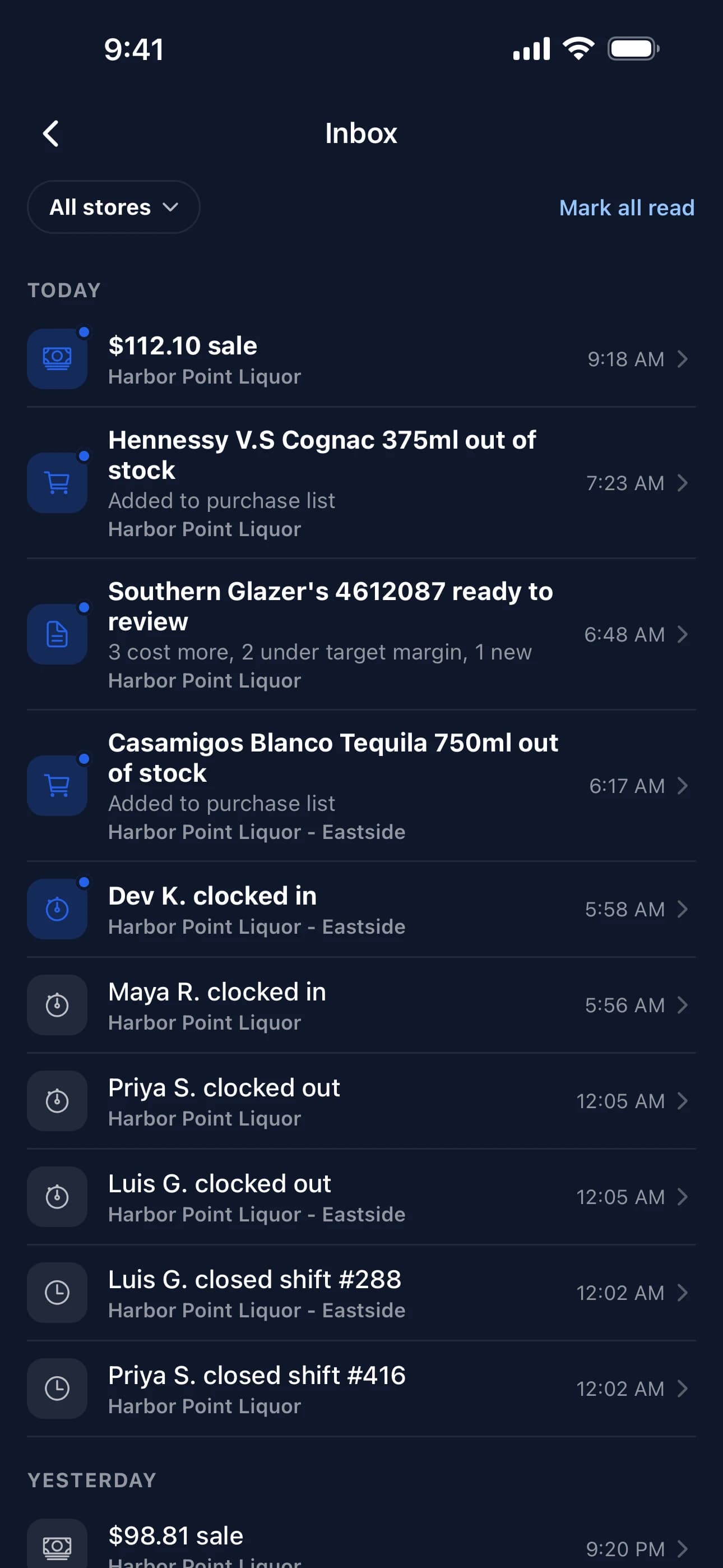
    Shift closed, a large sale, someone clocking out, an invoice ready to check. You choose which ones buzz.

  • Every store, one app

    Run two stores? See them side by side, or switch with one tap.

Owner app for iPhone5.0 ★ on the App Store
Owner app activity feed: shift closed, a large sale, a clock-out, an invoice ready
Owner app product page with a sales trend
Owner app day summary: net sales against last week with an hourly chart
Ceyyonow

Shift #416 closed · $5,482.10

Harbor Point Liquor

Bayline Distributing

Invoice 70412 · Sep 24

Totals match

Tito's Handmade Vodka 750ml

1 case · 12

$17.95

per unit

4.1%

Modelo Especial 12pk 12oz

5 cases · 2

$14.10

per unit

same

Josh Cabernet Sauvignon 750ml

2 cases · 12

$9.25

per unit

-2.6%

White Claw Variety 12pk

3 cases · 2

$16.40

per unit

5.1%

Casamigos Blanco 750ml

1 case · 6

$38.50

per unit

same

2 costs went up since the last invoice

Review

03 · Invoices New

Forward the invoice. We'll read it.

Forward a distributor's invoice and every line is read, matched to your products, and checked against what you paid last time. When a cost goes up, you see it before your shelf price falls behind.

  • Your own inbox

    Every store gets a Ceyyo address. Forward the PDF from your email, that's it.

  • Cases worked out

    Cases, packs and bottles are turned into the units you actually sell.

  • Cost history

    Every item keeps a record of what you paid, invoice by invoice.

In early access. Ask about it when we talk.

04 · The rest of the day

Everything a counter needs.

One plan. All of this is in it.

Internet down? Keep selling.

The register keeps your products and sales on the machine and syncs when the connection is back. A dead line never closes the counter.

Promotions

Set a deal once, like 2 for $3.99 across a group of products. Pause it, end it, or let it run.

Time clock

Staff clock in and out on the register with their PIN. You get the hours, and a heads-up when someone clocks out.

Shift reports

Close the shift, count the drawer, and the report is on your phone before you're out the door.

Scan to change a price

Point your phone at a barcode, fix the price, and the register has it on the next scan.

Returns and price checks

Returns, voids, drawer opens and price checks are all logged with who did them.

A dashboard for the office

Products, prices, categories and reports on a big screen, for the nights you're doing the books.

Works with your counter

Windows touchscreen, receipt printer, scanner and cash drawer. Already have them? We install on what you have.

05 · Pricing

Straight terms.

Switching takes a day, not a season. Here is the whole deal.

One plan

$99a month
per store

$139 a month with two registers. Setup is quoted once, with your hardware.

  • The register, with deals, ID checks and time clock
  • Owner app for iPhone and the web dashboard
  • Shift reports, sales reports, product history
  • Setup at your counter and your product list imported
  • Updates as we ship them
  • Phone support from people who've run a store
Get a free demo

No contract

Month to month. Leave any time and take your products and sales with you.

Keep your card processor

Keep the processor and the pad you have. We don't make you switch to ours.

We come to the store

We import your products before we arrive, set up at your counter, and stay for the first sale.

06 · Why we built it

Built behind a counter.

Ceyyo started in our own liquor store in the Bay Area. We needed a register a new cashier could run on their first shift, and a way to see the store from home without calling in. Nothing we tried did both, so we built it.

It has rung up real sales for 6 years, and we still run our own store on it. Every feature on this page started as a problem at our counter or at one of yours.

2020

Ringing sales since

1 day

To switch over

None

Long-term contract

07 · Questions

What owners ask first.

How long does switching take?

A day. We take an export of your products before we arrive, load them, set up the register at your counter, and stay until you have rung real sales. Most stores are selling on Ceyyo the same afternoon.

What happens to my products and prices?

They come with you. We import what you have today from your current system or a spreadsheet, and we go through the list with you before you open.

What hardware do I need?

A Windows touchscreen register, a receipt printer, a barcode scanner, and a cash drawer. If you already have them, we install on them. If not, we quote a bundle with setup.

Is there a contract?

No. Month to month. Cancel any time and take an export of your products and sales with you.

Do I have to change card processors?

No. Keep the processor and the pad you have. The register takes cash, EBT and cards through your existing terminal.

What if the internet goes down?

The register keeps selling. It holds the catalogue and the sales on the machine and syncs when the connection is back, so a dead line never closes the counter.

What does it cost?

$99 a month per store, $139 with two registers. Everything is in the one plan: register, owner app, dashboard, promotions, reports and phone support. Setup is a one-time fee quoted with your hardware.

What about a second store?

Each store is its own plan. The owner app shows all of them in one place.

See it on your counter.

You'll get a store owner on the line, not a sales team. Fifteen minutes is enough to see the register on a store like yours and hear what switching takes.

Serving the Bay Area, California.

Leave your number

We call back the same day.